[SOLVED] Upgrading Apache Kafka 2.7 to Java 11 Changes authenticationID sent to ZooKeeper Enabling Only 1 Kafka Broker to r/w znodes

The title of this post is a bit of mouthful and requires a bit more explanation.

I am running a pure open-source version of Kafka (currently running 2.7) and am using SASL/GSSAPI connections between all of the brokers and ZooKeeper. Currently, the whole system, including ZooKeeper, is running Java 8 and it is long-overdue to be upgraded to Java 11.

Upgrading Kafka to Java 11 causes the server to send an incorrect authenticationID String to ZooKeeper which results in the ACLs on the znodes being set to the hostname of the first Kafka server that connects to ZooKeeper. This results in only one of the Kafka hosts being able to r/w the znodes.

Prior to upgrading the following are the logs from one of the ZooKeeper nodes:

2021-05-17 14:47:35,345 [myid:1] - INFO  [NIOServerCxn.Factory:0.0.0.0/0.0.0.0:2181:NIOServerCnxnFactory@197] - Accepted socket connection from /172.19.65.22:41698
2021-05-17 14:47:35,357 [myid:1] - INFO  [NIOServerCxn.Factory:0.0.0.0/0.0.0.0:2181:ZooKeeperServer@868] - Client attempting to establish new session at /172.19.65.22:41698
2021-05-17 14:47:35,367 [myid:1] - INFO  [CommitProcessor:1:ZooKeeperServer@617] - Established session 0x1797ac46a0f0000 with negotiated timeout 18000 for client /172.19.65.22:41698
2021-05-17 14:47:35,470 [myid:1] - INFO  [NIOServerCxn.Factory:0.0.0.0/0.0.0.0:2181:SaslServerCallbackHandler@118] - Successfully authenticated client: authenticationID=kafka/vmwqsrdvk01.dv.quasar.nadops.net@EXAMPLE.NET;  authorizationID=kafka/vmwqsrdvk01.dv.quasar.nadops.net@EXAMPLE.NET.
2021-05-17 14:47:35,474 [myid:1] - INFO  [NIOServerCxn.Factory:0.0.0.0/0.0.0.0:2181:SaslServerCallbackHandler@134] - Setting authorizedID: kafka
2021-05-17 14:47:35,474 [myid:1] - INFO  [NIOServerCxn.Factory:0.0.0.0/0.0.0.0:2181:ZooKeeperServer@964] - adding SASL authorization for authorizationID: kafka

The following is the corresponding logs from the Kafka host making the connection:

[2021-05-17 14:47:37,512] INFO Successfully authenticated client: authenticationID=kafka/vmwqsrdvk01.dv.quasar.nadops.net@EXAMPLE.NET; authorizationID=kafka/vmwqsrdvk01.dv.quasar.nadops.net@EXAMPLE.NET. (org.apache.kafka.common.secur
ity.authenticator.SaslServerCallbackHandler)

The most important part of this is that ZooKeeper sees the authenticationID as kafka/vmwqsrdvk01.dv.quasar.nadops.net@EXAMPLE.NET. ZooKeeper is configured with the following options so that the host and realm will be removed from the authenticationID. This will leave the service name, ‘kafka‘, and result in all of the Kakfa znodes with kafka as the owner of the node. This then enables all of the hosts in the Kafka cluster r/w access to those znodes. Following are the configurations in ZooKeeper that enable this behavior.

kerberos.removeHostFromPrincipal=true
kerberos.removeRealmFromPrincipal=true

The resulting znodes ACLs are

[zk: localhost:2181(CONNECTED) 5] getAcl /brokers
'world,'anyone
: r
'sasl,'kafka
: cdrwa

System Configurations

Following are all of the configurations for both the ZooKeeper and Kafka cluster:

ZooKeeper

zoo.cfg

maxClientCnxns=50
tickTime=2000
initLimit=10
syncLimit=5
dataDir=/data/data_dir
dataLogDir=/zk/data_log_dir
authProvider.1=org.apache.zookeeper.server.auth.SASLAuthenticationProvider
jaasLoginRenew=3600000
clientPort=2181
kerberos.removeHostFromPrincipal=true
kerberos.removeRealmFromPrincipal=true

server.1=zk2-01.dv.quasar.nadops.net:2888:3888
server.2=zk2-02.dv.quasar.nadops.net:2888:3888
server.3=zk2-03.dv.quasar.nadops.net:2888:3888

jaas.conf

Server {
  com.sun.security.auth.module.Krb5LoginModule required
  useKeyTab=true
  keyTab="/etc/zookeeper/conf/vmwqsrdvz201.dv.quasar.nadops.net.keytab"
  storeKey=true
  useTicketCache=false
  principal="zookeeper/vmwqsrdvz201.dv.quasar.nadops.net@EXAMPLE.NET";
};

Kafka

broker-jaas.conf

KafkaServer {
  com.sun.security.auth.module.Krb5LoginModule required
  useKeyTab=true
  keyTab="/usr/local/kafka/config/vmwqsrdvk01.dv.quasar.nadops.net.keytab"
  storeKey=true
  principal="kafka/vmwqsrdvk01.dv.quasar.nadops.net@EXAMPLE.NET";
};

Client {
  com.sun.security.auth.module.Krb5LoginModule required
  useKeyTab=true
  keyTab="/usr/local/kafka/config/vmwqsrdvk01.dv.quasar.nadops.net.keytab"
  storeKey=true
  serviceName="zookeeper"
  principal="kafka/vmwqsrdvk01.dv.quasar.nadops.net@EXAMPLE.NET";
};

server.properties

Only the relevant configs are included below.

listener.security.protocol.map=PLAINTEXT:PLAINTEXT,SSL:SSL,SASL_PLAINTEXT:SASL_PLAINTEXT,SASL_SSL:SASL_SSL,BROKER_LISTENER:SASL_SSL

inter.broker.listener.name=BROKER_LISTENER
listeners=SASL_SSL://:9092,BROKER_LISTENER://:9093

ssl.keystore.location=/usr/local/kafka/config/kafka01.dv.quasar.nadops.net-keystore.jks
ssl.keystore.password=***
ssl.key.password=***
ssl.truststore.location=/usr/local/kafka/config/kafka01.dv.quasar.nadops.net-truststore.jks
ssl.truststore.password=***
sasl.kerberos.service.name=kafka
sasl.mechanism.inter.broker.protocol=GSSAPI
sasl.enabled.mechanisms=GSSAPI
zookeeper.set.acl=true
super.users=User:kafka
authorizer.class.name=kafka.security.auth.SimpleAclAuthorizer
allow.everyone.if.no.acl.found=false

Upgrading Kafka to Java 11

Once Kafka (leaving ZooKeeper on Java 8) is upgraded to Java 11 Kafka no longer sends the expected authorizationID String to ZooKeeper.

Following are the ZooKeeper logs of the same authentication:

2021-05-18 14:31:01,627 [myid:3] - INFO  [NIOServerCxn.Factory:0.0.0.0/0.0.0.0:2181:NIOServerCnxnFactory@197] - Accepted socket connection from /172.19.65.23:53374
2021-05-18 14:31:01,631 [myid:3] - INFO  [NIOServerCxn.Factory:0.0.0.0/0.0.0.0:2181:ZooKeeperServer@868] - Client attempting to establish new session at /172.19.65.23:53374
2021-05-18 14:31:01,636 [myid:3] - INFO  [CommitProcessor:3:ZooKeeperServer@617] - Established session 0x3797fd27e300004 with negotiated timeout 18000 for client /172.19.65.23:53374
2021-05-18 14:31:01,728 [myid:3] - INFO  [NIOServerCxn.Factory:0.0.0.0/0.0.0.0:2181:SaslServerCallbackHandler@118] - Successfully authenticated client: authenticationID=vmwqsrdvk02@EXAMPLE.NET;  authorizationID=kafka/vmwqsrdvk02.dv.quasar.nadops.net@EXAMPLE.NET.
2021-05-18 14:31:01,728 [myid:3] - INFO  [NIOServerCxn.Factory:0.0.0.0/0.0.0.0:2181:SaslServerCallbackHandler@134] - Setting authorizedID: vmwqsrdvk02
2021-05-18 14:31:01,728 [myid:3] - INFO  [NIOServerCxn.Factory:0.0.0.0/0.0.0.0:2181:ZooKeeperServer@964] - adding SASL authorization for authorizationID: vmwqsrdvk02

Following are the logs from Kafka that results in an exception being thrown because it is unable to write to the ZooKeeper znode:

[2021-05-18 14:31:01,410] INFO Initiating client connection, connectString=vmwqsrdvz201.dv.quasar.nadops.net:2181,vmwqsrdvz202.dv.quasar.nadops.net:2181,vmwqsrdvz203.dv.quasar.nadops.net:2181 sessionTimeout=18000 watcher=kafka.zookeeper.ZooKeeperClient$ZooKeeperClientWatcher$@39b43d60 (org.apache.zookeeper.ZooKeeper)
[2021-05-18 14:31:01,414] INFO jute.maxbuffer value is 4194304 Bytes (org.apache.zookeeper.ClientCnxnSocket)
[2021-05-18 14:31:01,419] INFO zookeeper.request.timeout value is 0. feature enabled= (org.apache.zookeeper.ClientCnxn)
[2021-05-18 14:31:01,421] INFO [ZooKeeperClient Kafka server] Waiting until connected. (kafka.zookeeper.ZooKeeperClient)
[2021-05-18 14:31:01,556] INFO Client successfully logged in. (org.apache.zookeeper.Login)
[2021-05-18 14:31:01,573] INFO TGT refresh thread started. (org.apache.zookeeper.Login)
[2021-05-18 14:31:01,577] INFO Client will use GSSAPI as SASL mechanism. (org.apache.zookeeper.client.ZooKeeperSaslClient)
[2021-05-18 14:31:01,604] INFO TGT valid starting at:        Tue May 18 14:31:01 UTC 2021 (org.apache.zookeeper.Login)
[2021-05-18 14:31:01,604] INFO TGT expires:                  Wed May 19 00:31:01 UTC 2021 (org.apache.zookeeper.Login)
[2021-05-18 14:31:01,605] INFO TGT refresh sleeping until: Tue May 18 22:32:58 UTC 2021 (org.apache.zookeeper.Login)
[2021-05-18 14:31:01,606] INFO Opening socket connection to server vmwqsrdvz203.dv.quasar.nadops.net/172.19.65.21:2181. Will attempt to SASL-authenticate using Login Context section 'Client' (org.apache.zookeeper.ClientCnxn)
[2021-05-18 14:31:01,614] INFO Socket connection established, initiating session, client: /172.19.65.23:53374, server: vmwqsrdvz203.dv.quasar.nadops.net/172.19.65.21:2181 (org.apache.zookeeper.ClientCnxn)
[2021-05-18 14:31:01,622] INFO Session establishment complete on server vmwqsrdvz203.dv.quasar.nadops.net/172.19.65.21:2181, sessionid = 0x3797fd27e300004, negotiated timeout = 18000 (org.apache.zookeeper.ClientCnxn)
[2021-05-18 14:31:01,626] INFO [ZooKeeperClient Kafka server] Connected. (kafka.zookeeper.ZooKeeperClient)
[2021-05-18 14:31:01,731] ERROR Fatal error during KafkaServer startup. Prepare to shutdown (kafka.server.KafkaServer)
org.apache.zookeeper.KeeperException$NoAuthException: KeeperErrorCode = NoAuth for /brokers/ids
        at org.apache.zookeeper.KeeperException.create(KeeperException.java:120)
        at org.apache.zookeeper.KeeperException.create(KeeperException.java:54)
        at kafka.zookeeper.AsyncResponse.maybeThrow(ZooKeeperClient.scala:564)
        at kafka.zk.KafkaZkClient.createRecursive(KafkaZkClient.scala:1662)
        at kafka.zk.KafkaZkClient.makeSurePersistentPathExists(KafkaZkClient.scala:1560)
        at kafka.zk.KafkaZkClient.$anonfun$createTopLevelPaths$1(KafkaZkClient.scala:1552)
        at kafka.zk.KafkaZkClient.$anonfun$createTopLevelPaths$1$adapted(KafkaZkClient.scala:1552)
        at scala.collection.immutable.List.foreach(List.scala:333)
        at kafka.zk.KafkaZkClient.createTopLevelPaths(KafkaZkClient.scala:1552)
        at kafka.server.KafkaServer.initZkClient(KafkaServer.scala:467)
        at kafka.server.KafkaServer.startup(KafkaServer.scala:233)
        at kafka.server.KafkaServerStartable.startup(KafkaServerStartable.scala:44)
        at kafka.Kafka$.main(Kafka.scala:82)
        at kafka.Kafka.main(Kafka.scala)
[2021-05-18 14:31:01,733] INFO shutting down (kafka.server.KafkaServer)

The authorizationID now provided by Kafka is now vmwqsrdvk02@EXAMPLE.NET, only the hostname and realm, and no longer the String that ZooKeeper expects. The resulting, derived authorizationID is vmwqsrdvk02 which means that only that Kafka host has r/w to any of the znodes which it creates.

Solution

After exhausting search options and finding multiple pages indicating that I have everything configured correctly, even for JDK 11, I posted to the #apache-kafka channel on chat.freenode.net and got a hint. Evidently, there are some JDKs that have bugs in their Kerberos implementation.

I was running java-11-openjdk-11.0.8.10-1.el7.x86_64 from CentOS 7 Updates. I double-checked and there was an updated JDK available.

After updating to the latest Java 11 JDK everything worked as expected. If the particular JDK that you are using is still not working try AdoptOpenJDK.
[SOLVED] Ambari There are no DataNodes to do rolling restarts when there are DataNodes that do need a restart

When maintaining a Hadoop cluster, you will need to restart various service from time-to-time when/if you update Hadoop configurations.

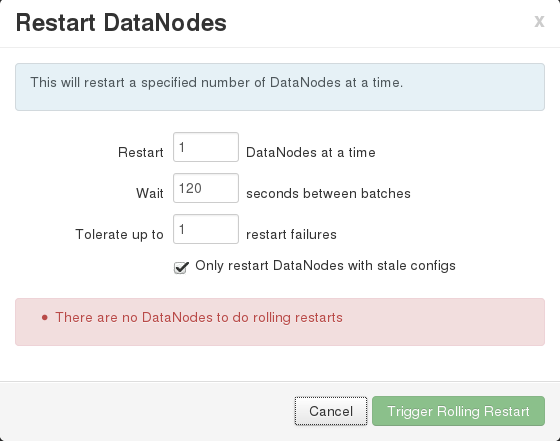
I ran into a problem today with Ambari where I wanted to do a rollling restart of all of my DataNodes, but when I clicked on the “Restart DataNodes” entry in the “Restart” drop down the dialog indicated “There are no DataNodes to do rolling restarts”.

This was clearly incorrect.

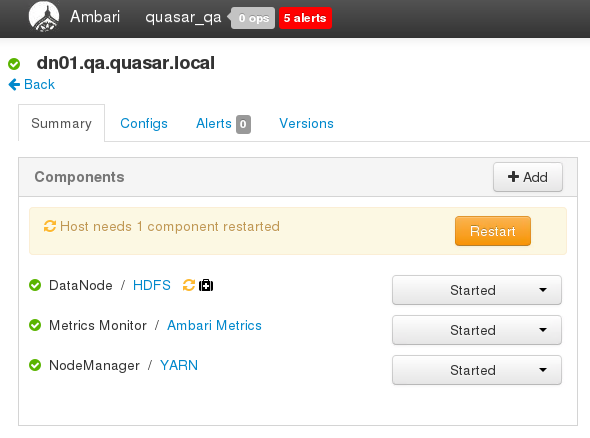
It did not take me too long to figure out that I had already put HDFS into Maintenance Mode.  As a result, Ambari does not see that there are any DataNodes that need to be restarted.

Taking HDFS out of Maintenance mode allowed me to then execute a rolling restart through Ambari.

[SOLVED] Unable to Connect to ambari-metrics-collector Issues

I was having some issues with the ambari-metrics family of services on a ‘pseudo-distributed’ cluster that I have installed on my workstation.

The symptoms were:

1.  Ambari indicated the following CRITICAL errors in the Ambari Dashboard under the Ambari Metrics section

Connection failed: [Errno 111] Connection refused to rchapin-wrkstn:6188

2.  After attempting to restart the ambari-metrics-collector via either the Ambari Dashboard or through the commandline (# ambari-metrics-collector [stop|start]) you see the following (similar) messages in the ambari-metrics-collector.log

2016-09-02 12:15:37,505 INFO org.apache.zookeeper.ZooKeeper: Client environment:java.library.path=/usr/lib/ams-hbase/lib/hadoop-native -XX:+UseConcMarkSweepGC -verbose:gc -XX:+PrintGCDetails -XX:+PrintGCDateStam
ps -Xloggc:/var/log/ambari-metrics-collector/collector-gc.log-201609021215
2016-09-02 12:15:37,505 INFO org.apache.zookeeper.ZooKeeper: Client environment:java.io.tmpdir=/tmp
2016-09-02 12:15:37,505 INFO org.apache.zookeeper.ZooKeeper: Client environment:java.compiler=<NA>
2016-09-02 12:15:37,505 INFO org.apache.zookeeper.ZooKeeper: Client environment:os.name=Linux
2016-09-02 12:15:37,505 INFO org.apache.zookeeper.ZooKeeper: Client environment:os.arch=amd64
2016-09-02 12:15:37,505 INFO org.apache.zookeeper.ZooKeeper: Client environment:os.version=3.10.0-327.10.1.el7.x86_64
2016-09-02 12:15:37,505 INFO org.apache.zookeeper.ZooKeeper: Client environment:user.name=ams
2016-09-02 12:15:37,505 INFO org.apache.zookeeper.ZooKeeper: Client environment:user.home=/home/ams
2016-09-02 12:15:37,505 INFO org.apache.zookeeper.ZooKeeper: Client environment:user.dir=/home/ams
2016-09-02 12:15:37,506 INFO org.apache.zookeeper.ZooKeeper: Initiating client connection, connectString=rchapin-wrkstn:2181 sessionTimeout=120000 watcher=hconnection-0x5524cca10x0, quorum=rchapin-wrkstn:2181, b
aseZNode=/ams-hbase-unsecure
2016-09-02 12:15:37,523 INFO org.apache.zookeeper.ClientCnxn: Opening socket connection to server rchapin-wrkstn/172.19.64.2:2181. Will not attempt to authenticate using SASL (unknown error)
2016-09-02 12:15:37,531 INFO org.apache.zookeeper.ClientCnxn: Socket connection established to rchapin-wrkstn/172.19.64.2:2181, initiating session
2016-09-02 12:15:37,536 INFO org.apache.zookeeper.ClientCnxn: Session establishment complete on server rchapin-wrkstn/172.19.64.2:2181, sessionid = 0x155eefbab613617, negotiated timeout = 40000
2016-09-02 12:15:37,582 WARN org.apache.hadoop.hbase.io.util.HeapMemorySizeUtil: hbase.regionserver.global.memstore.upperLimit is deprecated by hbase.regionserver.global.memstore.size
2016-09-02 12:15:38,044 WARN org.apache.hadoop.hdfs.shortcircuit.DomainSocketFactory: The short-circuit local reads feature cannot be used because libhadoop cannot be loaded.
2016-09-02 12:15:38,089 INFO org.apache.phoenix.metrics.Metrics: Initializing metrics system: phoenix
2016-09-02 12:15:38,112 WARN org.apache.hadoop.metrics2.impl.MetricsConfig: Cannot locate configuration: tried hadoop-metrics2-phoenix.properties,hadoop-metrics2.properties
2016-09-02 12:15:38,167 INFO org.apache.hadoop.metrics2.impl.MetricsSystemImpl: Scheduled snapshot period at 10 second(s).
2016-09-02 12:15:38,168 INFO org.apache.hadoop.metrics2.impl.MetricsSystemImpl: phoenix metrics system started
2016-09-02 12:15:38,362 WARN org.apache.hadoop.hbase.io.util.HeapMemorySizeUtil: hbase.regionserver.global.memstore.upperLimit is deprecated by hbase.regionserver.global.memstore.size
2016-09-02 12:15:38,494 WARN org.apache.hadoop.hbase.io.util.HeapMemorySizeUtil: hbase.regionserver.global.memstore.upperLimit is deprecated by hbase.regionserver.global.memstore.size
2016-09-02 12:15:38,627 INFO org.apache.hadoop.hbase.zookeeper.RecoverableZooKeeper: Process identifier=hconnection-0x48d7ad8b connecting to ZooKeeper ensemble=rchapin-wrkstn:2181
2016-09-02 12:15:38,627 INFO org.apache.zookeeper.ZooKeeper: Initiating client connection, connectString=rchapin-wrkstn:2181 sessionTimeout=120000 watcher=hconnection-0x48d7ad8b0x0, quorum=rchapin-wrkstn:2181, b
aseZNode=/ams-hbase-unsecure
2016-09-02 12:15:38,629 INFO org.apache.zookeeper.ClientCnxn: Opening socket connection to server rchapin-wrkstn/172.19.64.2:2181. Will not attempt to authenticate using SASL (unknown error)
2016-09-02 12:15:38,629 INFO org.apache.zookeeper.ClientCnxn: Socket connection established to rchapin-wrkstn/172.19.64.2:2181, initiating session
2016-09-02 12:15:38,633 INFO org.apache.zookeeper.ClientCnxn: Session establishment complete on server rchapin-wrkstn/172.19.64.2:2181, sessionid = 0x155eefbab613618, negotiated timeout = 40000
2016-09-02 12:16:27,001 INFO org.apache.hadoop.hbase.client.RpcRetryingCaller: Call exception, tries=10, retries=35, started=48362 ms ago, cancelled=false, msg=
2016-09-02 12:16:47,033 INFO org.apache.hadoop.hbase.client.RpcRetryingCaller: Call exception, tries=11, retries=35, started=68394 ms ago, cancelled=false, msg=
2016-09-02 12:17:07,148 INFO org.apache.hadoop.hbase.client.RpcRetryingCaller: Call exception, tries=12, retries=35, started=88509 ms ago, cancelled=false, msg=
2016-09-02 12:17:27,257 INFO org.apache.hadoop.hbase.client.RpcRetryingCaller: Call exception, tries=13, retries=35, started=108618 ms ago, cancelled=false, msg=
2016-09-02 12:17:47,276 INFO org.apache.hadoop.hbase.client.RpcRetryingCaller: Call exception, tries=14, retries=35, started=128637 ms ago, cancelled=false, msg=
2016-09-02 12:18:07,333 INFO org.apache.hadoop.hbase.client.RpcRetryingCaller: Call exception, tries=15, retries=35, started=148694 ms ago, cancelled=false, msg=
2016-09-02 12:18:27,397 INFO org.apache.hadoop.hbase.client.RpcRetryingCaller: Call exception, tries=16, retries=35, started=168758 ms ago, cancelled=false, msg=
2016-09-02 12:18:47,410 INFO org.apache.hadoop.hbase.client.RpcRetryingCaller: Call exception, tries=17, retries=35, started=188771 ms ago, cancelled=false, msg=
2016-09-02 12:19:07,555 INFO org.apache.hadoop.hbase.client.RpcRetryingCaller: Call exception, tries=18, retries=35, started=208916 ms ago, cancelled=false, msg=
2016-09-02 12:19:27,732 INFO org.apache.hadoop.hbase.client.RpcRetryingCaller: Call exception, tries=19, retries=35, started=229093 ms ago, cancelled=false, msg=
2016-09-02 12:19:47,923 INFO org.apache.hadoop.hbase.client.RpcRetryingCaller: Call exception, tries=20, retries=35, started=249284 ms ago, cancelled=false, msg=
2016-09-02 12:20:07,950 INFO org.apache.hadoop.hbase.client.RpcRetryingCaller: Call exception, tries=21, retries=35, started=269311 ms ago, cancelled=false, msg=
2016-09-02 12:20:28,051 INFO org.apache.hadoop.hbase.client.RpcRetryingCaller: Call exception, tries=22, retries=35, started=289412 ms ago, cancelled=false, msg=
2016-09-02 12:20:48,230 WARN org.apache.hadoop.hbase.client.ConnectionManager$HConnectionImplementation: Checking master connection
com.google.protobuf.ServiceException: org.apache.hadoop.hbase.exceptions.ConnectionClosingException: Call to rchapin-wrkstn/172.19.64.2:61300 failed on local exception: org.apache.hadoop.hbase.exceptions.Connect
ionClosingException: Connection to rchapin-wrkstn/172.19.64.2:61300 is closing. Call id=46, waitTime=1
        at org.apache.hadoop.hbase.ipc.AbstractRpcClient.callBlockingMethod(AbstractRpcClient.java:223)
        at org.apache.hadoop.hbase.ipc.AbstractRpcClient$BlockingRpcChannelImplementation.callBlockingMethod(AbstractRpcClient.java:287)
        at org.apache.hadoop.hbase.protobuf.generated.MasterProtos$MasterService$BlockingStub.isMasterRunning(MasterProtos.java:55824)
        at org.apache.hadoop.hbase.client.ConnectionManager$HConnectionImplementation$MasterServiceState.isMasterRunning(ConnectionManager.java:1444)
        at org.apache.hadoop.hbase.client.ConnectionManager$HConnectionImplementation.isKeepAliveMasterConnectedAndRunning(ConnectionManager.java:2085)
        at org.apache.hadoop.hbase.client.ConnectionManager$HConnectionImplementation.getKeepAliveMasterService(ConnectionManager.java:1708)
        at org.apache.hadoop.hbase.client.MasterCallable.prepare(MasterCallable.java:38)
        at org.apache.hadoop.hbase.client.RpcRetryingCaller.callWithRetries(RpcRetryingCaller.java:124)
        at org.apache.hadoop.hbase.client.HBaseAdmin.executeCallable(HBaseAdmin.java:4082)
        at org.apache.hadoop.hbase.client.HBaseAdmin.getTableDescriptor(HBaseAdmin.java:527)
        at org.apache.hadoop.hbase.client.HBaseAdmin.getTableDescriptor(HBaseAdmin.java:549)
        at org.apache.phoenix.query.ConnectionQueryServicesImpl.ensureTableCreated(ConnectionQueryServicesImpl.java:810)

3.  You will see WARNings similar to the following in the hbase-ams-regionserver-<hostname>.log file

2016-09-02 12:52:56,589 INFO  [LruBlockCacheStatsExecutor] hfile.LruBlockCache: totalSize=236.59 KB, freeSize=222.74 MB, max=222.98 MB, blockCount=1, accesses=4, hits=3, hitRatio=75.00%, , cachingAccesses=4, cac
hingHits=3, cachingHitsRatio=75.00%, evictions=119, evicted=0, evictedPerRun=0.0
2016-09-02 12:53:52,091 WARN  [timeline] timeline.HadoopTimelineMetricsSink: Unable to send metrics to collector by address:http://rchapin-wrkstn:6188/ws/v1/timeline/metrics
2016-09-02 12:53:52,092 WARN  [timeline] timeline.HadoopTimelineMetricsSink: Unable to send metrics to collector by address:http://rchapin-wrkstn:6188/ws/v1/timeline/metrics
2016-09-02 12:53:52,094 WARN  [timeline] timeline.HadoopTimelineMetricsSink: Unable to send metrics to collector by address:http://rchapin-wrkstn:6188/ws/v1/timeline/metrics
2016-09-02 12:53:52,096 WARN  [timeline] timeline.HadoopTimelineMetricsSink: Unable to send metrics to collector by address:http://rchapin-wrkstn:6188/ws/v1/timeline/metrics
2016-09-02 12:53:52,097 WARN  [timeline] timeline.HadoopTimelineMetricsSink: Unable to send metrics to collector by address:http://rchapin-wrkstn:6188/ws/v1/timeline/metrics
2016-09-02 12:54:52,091 WARN  [timeline] timeline.HadoopTimelineMetricsSink: Unable to send metrics to collector by address:http://rchapin-wrkstn:6188/ws/v1/timeline/metrics
2016-09-02 12:55:52,092 WARN  [timeline] timeline.HadoopTimelineMetricsSink: Unable to send metrics to collector by address:http://rchapin-wrkstn:6188/ws/v1/timeline/metrics
2016-09-02 12:55:52,093 WARN  [timeline] timeline.HadoopTimelineMetricsSink: Unable to send metrics to collector by address:http://rchapin-wrkstn:6188/ws/v1/timeline/metrics

It turned out that the ambari-metrics hbase instance had gotten into an unstable state and that what I needed to do was delete all of the metrics HBase data and restart all of the services.

Making that happen was not as straight-forward as you might imagine.

1. Shutdown all of the AMS (Ambari Metrics System) components.  Do so in the following order:

1. In the Ambari Dashboard, go to the ‘Ambari Metrics’ section and under the ‘Service Actions’ dropdown click ‘Stop’.  If you want, you can click the checkbox to turn on Maintenance Mode to suppress alerts.

2. After the background operation has completed, on the ambari host where you are having issues confirm that all of the AMS components have stopped:

# ambari-metrics-monitor status
psutil build directory is not empty, continuing...
ambari-metrics-monitor currently not running
Usage: /usr/sbin/ambari-metrics-monitor {start|stop|restart|status}

# ambari-metrics-collector status
AMS is running as process 1062.

If either of the processes still report as running issue a stop command.  In my case, I did as follows

# ambari-metrics-collector stop
WARNING: ambari-metrics-collector did not stop gracefully after 5 seconds: Trying to kill with kill -9
ERROR: Unable to kill 1062
Stopping HBase master
no master to stop because no pid file /var/run/ambari-metrics-collector//hbase-root-master.pid

I then confirmed that pid 1062 was indeed dead

# ps -ef | fgrep 1062

2. Delete the AMS HBase data

In the Ambari Dashboard, under the Ambari Metrics section do a search for the hbase.rootdir configuration value.

In my case, I have AMS configured to write to HDFS so the value of this config was: hdfs://rchapin-wrkstn:8020/user/ams/hbase

Then search for the the hbase.tmp.dir configuration value.

In my case, the setting was: /var/lib/ambari-metrics-collector/hbase-tmp

If your hbase.rootdir points to HDFS delete all of the data as follows (as the hdfs user)

[hdfs@rchapin-wrkstn ~]$ hdfs dfs -rm -r -skipTrash /user/ams/hbase/*

If it is on your local file system, simply rm -rf that data, leaving the parent directory

Delete the data in the hbase.tmp.dir (as the root user)

[root@rchapin-wrkstn ~]# rm -rf /var/lib/ambari-metrics-collector/hbase-tmp/*

3. Now restart the AMS services

First, via the Ambari Dashboard, go to the ‘Ambari Metrics’ section and under the ‘Service Actions’ dropdown click ‘Start’.  If you want, you can click the checkbox to turn off Maintenance Mode if you set it when stopping the services.

Then confirm that both the ambari-metrics-monitor and ambari-metrics-collector services have started

[root@rchapin-wrkstn ~]# ambari-metrics-collector status
AMS is running as process 12229.

[root@rchapin-wrkstn ~]# ambari-metrics-monitor status
psutil build directory is not empty, continuing...
Found ambari-metrics-monitor PID: 12916
ambari-metrics-monitor running.
Monitor PID at: /var/run/ambari-metrics-monitor/ambari-metrics-monitor.pid
Monitor out at: /var/log/ambari-metrics-monitor/ambari-metrics-monitor.out

If you see errors in the ambari-metrics-collector.log similar to the following it means that there was a problem re-creating the HBase tables for the metrics-collector and that the AMS HBase tables are missing:

2016-09-02 13:35:36,200 WARN org.apache.hadoop.yarn.server.applicationhistoryservice.metrics.timeline.query.DefaultPhoenixDataSource: Unable to connect to HBase store using Phoenix.
org.apache.phoenix.exception.PhoenixIOException: SYSTEM.CATALOG
        at org.apache.phoenix.util.ServerUtil.parseServerException(ServerUtil.java:108)
        at org.apache.phoenix.query.ConnectionQueryServicesImpl.metaDataCoprocessorExec(ConnectionQueryServicesImpl.java:1039)
        at org.apache.phoenix.query.ConnectionQueryServicesImpl.metaDataCoprocessorExec(ConnectionQueryServicesImpl.java:1002)
        at org.apache.phoenix.query.ConnectionQueryServicesImpl.createTable(ConnectionQueryServicesImpl.java:1208)
        at org.apache.phoenix.query.DelegateConnectionQueryServices.createTable(DelegateConnectionQueryServices.java:112)
        at org.apache.phoenix.schema.MetaDataClient.createTableInternal(MetaDataClient.java:1974)
....
Caused by: org.apache.hadoop.hbase.TableNotFoundException: SYSTEM.CATALOG
        at org.apache.hadoop.hbase.client.ConnectionManager$HConnectionImplementation.locateRegionInMeta(ConnectionManager.java:1264)
        at org.apache.hadoop.hbase.client.ConnectionManager$HConnectionImplementation.locateRegion(ConnectionManager.java:1162)
        at org.apache.hadoop.hbase.client.ConnectionManager$HConnectionImplementation.locateRegion(ConnectionManager.java:1146)
        at org.apache.hadoop.hbase.client.ConnectionManager$HConnectionImplementation.locateRegion(ConnectionManager.java:1103)

To fix, delete the node in zookeeper, and restart the AMS services

Check the current value of the Ambari Metrics config: zookeeper.znode.parent.  In my case the value was: /ams-hbase-unsecure

Stop all of the AMS services as described above.

Then, using the zookeeper cli connect to your zookeeper cluster and delete the zookeeper node

1. Start up the zookeeper client

# /usr/hdp/current/zookeeper-client/bin/zkCli.sh

2. Connect to the zookeeper cluster, and list the root nodes for the cluster

[zk: localhost:2181(CONNECTED) 1] connect 127.0.0.1:2181
[zk: 127.0.0.1:2181(CONNECTED) 2] ls /
[hiveserver2, zookeeper, hbase-unsecure, ams-hbase-unsecure, rmstore]

3. Delete the ams-hbase-unsecure node

[zk: 127.0.0.1:2181(CONNECTED) 3] rmr /ams-hbase-unsecure

    4. Restart the AMS services as described above and then confirm that the ams-hbase-unsecure node was recreated in zookeeper.

[zk: 127.0.0.1:2181(CONNECTED) 4] ls /
[hiveserver2, zookeeper, hbase-unsecure, ams-hbase-unsecure, rmstore]


How to Return Hive Query Results Similary to MySQL \G in One Vertical Column

When trying to look at data in a database with really wide rows even just selecting 1 row to see the data is nearly impossible to understand when the single row wraps 7 or 8 times.

MySQL offers the ‘\G’ option to display the output in a single column.

The corresponding method in Hive is to execute the following set command:

> !set outputformat vertical
> SELECT something FROM some table;

[SOLVED] java.lang.NoSuchMethodError: org.apache.avro.generic.GenericData.createDatumWriter When Using Avro Data with MapReduce

I am working on a project and have decided to use Avro for the data serialization format.

I encountered the following error when trying to set up the unit test to test the mapper implementation through Eclipse:

java.lang.NoSuchMethodError: org.apache.avro.generic.GenericData.createDatumWriter(Lorg/apache/avro/Schema;)Lorg/apache/avro/io/DatumWriter;
    at org.apache.avro.hadoop.io.AvroSerialization.getSerializer(AvroSerialization.java:114)
    at org.apache.hadoop.io.serializer.SerializationFactory.getSerializer(SerializationFactory.java:82)
    at org.apache.hadoop.mrunit.internal.io.Serialization.copy(Serialization.java:67)
    at org.apache.hadoop.mrunit.internal.io.Serialization.copy(Serialization.java:98)
    at org.apache.hadoop.mrunit.internal.io.Serialization.copyWithConf(Serialization.java:111)
    at org.apache.hadoop.mrunit.TestDriver.copy(TestDriver.java:676)
    at org.apache.hadoop.mrunit.TestDriver.copyPair(TestDriver.java:680)
    at org.apache.hadoop.mrunit.MapDriverBase.addInput(MapDriverBase.java:120)
    at org.apache.hadoop.mrunit.MapDriverBase.addInput(MapDriverBase.java:130)
    at org.apache.hadoop.mrunit.MapDriverBase.addAll(MapDriverBase.java:141)
    at org.apache.hadoop.mrunit.MapDriverBase.withAll(MapDriverBase.java:247)
    at com.ryanchapin.hadoop.mapreduce.mrunit.UserDataSortTest.testMapper(UserDataSortTest.java:111)
    at sun.reflect.NativeMethodAccessorImpl.invoke0(Native Method)
    at sun.reflect.NativeMethodAccessorImpl.invoke(NativeMethodAccessorImpl.java:62)
    at sun.reflect.DelegatingMethodAccessorImpl.invoke(DelegatingMethodAccessorImpl.java:43)
    at java.lang.reflect.Method.invoke(Method.java:497)
    at org.junit.runners.model.FrameworkMethod$1.runReflectiveCall(FrameworkMethod.java:45)
    at org.junit.internal.runners.model.ReflectiveCallable.run(ReflectiveCallable.java:15)
    at org.junit.runners.model.FrameworkMethod.invokeExplosively(FrameworkMethod.java:42)
    at org.junit.internal.runners.statements.InvokeMethod.evaluate(InvokeMethod.java:20)
    at org.junit.internal.runners.statements.RunBefores.evaluate(RunBefores.java:28)
    at org.junit.internal.runners.statements.RunAfters.evaluate(RunAfters.java:30)
    at org.junit.runners.ParentRunner.runLeaf(ParentRunner.java:263)
    at org.junit.runners.BlockJUnit4ClassRunner.runChild(BlockJUnit4ClassRunner.java:68)
    at org.junit.runners.BlockJUnit4ClassRunner.runChild(BlockJUnit4ClassRunner.java:47)
    at org.junit.runners.ParentRunner$3.run(ParentRunner.java:231)
    at org.junit.runners.ParentRunner$1.schedule(ParentRunner.java:60)
    at org.junit.runners.ParentRunner.runChildren(ParentRunner.java:229)
    at org.junit.runners.ParentRunner.access$000(ParentRunner.java:50)
    at org.junit.runners.ParentRunner$2.evaluate(ParentRunner.java:222)
    at org.junit.runners.ParentRunner.run(ParentRunner.java:300)
    at org.eclipse.jdt.internal.junit4.runner.JUnit4TestReference.run(JUnit4TestReference.java:86)
    at org.eclipse.jdt.internal.junit.runner.TestExecution.run(TestExecution.java:38)
    at org.eclipse.jdt.internal.junit.runner.RemoteTestRunner.runTests(RemoteTestRunner.java:459)
    at org.eclipse.jdt.internal.junit.runner.RemoteTestRunner.runTests(RemoteTestRunner.java:675)
    at org.eclipse.jdt.internal.junit.runner.RemoteTestRunner.run(RemoteTestRunner.java:382)
    at org.eclipse.jdt.internal.junit.runner.RemoteTestRunner.main(RemoteTestRunner.java:192)

After digging through the source code and finding that method did, infact, exist.  I tried running the same unit test via the maven cli.  It worked just fine.

After more digging, it turns out that what was happening was that the classpath in Eclipse was using avro-1.7.4 from the hadoop-common and hadoop-mapreduce-client-core jars in my project, and not the 1.7.7 version that I was trying to use.

To see what the difference between running it via the maven cli and running it in eclipse, I went through the following steps:

Added the following code to my test code to print out the classpath at runtime:

// Print out the classpath
ClassLoader sysClassLoader = ClassLoader.getSystemClassLoader();
URL[] urls = ((URLClassLoader)sysClassLoader).getURLs();
System.out.println("---------------------------------------");
for(int i=0; i< urls.length; i++) {
    System.out.println(urls[i].getFile());
}
System.out.println("---------------------------------------");

Then ran it, in Eclipse and saved off the console output.

Then, I added a sleep call for 100 seconds in the same place in the code.  This enabled me to run the test again from the terminal and copy the project/target/surefire/ directory which contained the surefirebooter.jar.  Click here to read more about that project.

After copying that jar to a temporary directory, I unpacked it and then compared the versions of avro between the Eclipse classpath and the classpath from the terminal and noticed that they were different.  Inspecting the dependency tree of my project it was clear that 1.7.4 was part of the hadooop jars I was using.

Ultimately, I ended up updating my version of avro to 1.7.4 in my pom to eliminate the conflict.

Debugging MapReduce MRv2 Code in Eclipse

Following is how to set-up your environment to be able to set breakpoints, step-through, and debug your MapReduce code in Eclipse.

All of the this was done on a machine running Linux, but should work just fine for any *nix machine, and perhaps Windows running Cygwin (assuming that you can get Hadoop and its naitive libraries compiled under Windows).

This also assumes that you are building your project with maven.

Install a pseudo-distributed hadooop cluster on your development box.  (Yes, this calls for another article on exactly how to do that which I will do shortly and link to from here).

Add the following environment variables to .bash_profile to ensure that they will be applied to any login shells (make sure to check the location of the directories for your installed hadoop distribution):

export LD_LIBRARY_PATH=/usr/lib/hadoop/lib/native
export HADOOP_HOME=/usr/lib/hadoop

Make sure to include the following dependencies in your pom:

  • hadoop-mapreduce-client-core
  • hadoop-common
  • hadoop-hdfs
  • hadoop-client

After you import your maven project into Eclipse update the Build Path to include the correct path to the Native library shared objects:

  1. Right-click on your project and select ‘Build Path -> Configure Build Path:
  2. Click on ‘Libraries’ tab:
  3. Click the drop-down arrow for the ‘Maven Dependencies’
  4. Click on the drop-down arrow on the ‘hadoop-common’.jar
  5. Select the ‘Native library location’ entry, and click ‘Edit’
  6. Browse to the path of the native directory, in my case it was /usr/lib/hadoop/lib/native.
  7. Click ‘OK’
  8. Click ‘OK’ to close the build path dialogue

Create a run configuration for the Main class in your project:

Make sure that you do not add the /etc/hadoop/conf* dir to the class path.

Add any commandline arguments for input and output directories to the ‘Program arguments’ section of the run configuration, that points to your LOCAL file system and not HDFS.

Afterwhich, you should be able to run your M/R code and debug it through Eclipse.

Passing an Array as an Argument to a Bash Function

If you want to pass an array of items to a bash function, the simple answer is that you need to pass the expanded values.  That means that you can pass the data as a quoted value, assuming that the elements are whitespace delimited, or you can pass it as a string and then split it using an updated IFS (Internal Field Separator) inside the function.

Following is an example of taking the output of a Hive query (a single column that is separated by new lines), wrapping it in quotes and passing it as a single value to the function.

#!/bin/bash

#
# This function will accept the expanded elements of the array
#
function foo() {
# Loop through elements in the first argument passed.
   # In this case, each is separated by whitespace so we do
   # not need to change the IFS
   for i in $1
   do
      echo "i = $i"
   done
}

# Dynamically build our hive query
HIVE_QRY="use somedb; select some_column from some_table;"

# Dynamically build the hive command to execute
CMD="hive -e '$HIVE_QRY'"

# Execute the hive query in a subshell and store the result in
# the 'QRY_RETVAL' variable
QRY_RETVAL=$(eval $CMD)

# Call the foo method and pass it the output of the query, /QUOTED/
# so that it will be passed as a single argument and not a series
# of arguments for each row returned by the query
foo "${QRY_RETVAL}"

Restarting Individual Services or the Entire HDP Stack in the Hortornworks Virtual Sandbox

I’m using the Hortonworks Virtual Sandbox for development and testing and wanted to restart the HDP stack without (of course) having to restart the VM.

It took me a little while to figure out how to go about it as Internet searches on the topic revealed very little.

It turns out that Hortonworks have set up their own service on the box, startup_script.

If you take a look at /etc/init.d/startup_script you will see that it calls a number of other shell scripts in /usr/lib/hue/tools/start_scripts/

To restart the whole stack simply issue the following command:

service startup_script restart

Running Dynamically Generated Hive Queries From a Shell Script

If you want to write a HQL hive query and run it mulitple times from a shell script, each time passing it different data for the query, here is a quick example that should get you started.

The first thing to know is that by specifying n number of -hivevar key value pairs when invoking hive on the command line will allow you to pass that data into the hive process.

For example, if you do the following

$ hive -e 'SELECT * FROM some_table' -hivevar FOO=blah

You will have passed in a key of FOO with the value of ‘blah’ to the hive process.

A more practical example would be wanting to run the same hive query over multiple data partitions.

In this example, I’ve got a hive database that has a ‘packets’ table partitioned by hours which looks like 2014032601.

The hive query file (dest_ip_hive.sql) would look like:

SELECT packets.sourceip FROM packets
WHERE packets.destip = "${hivevar:DEST_IP}"
AND packets.hour = ${hivevar:HOUR}
GROUP BY packets.sourceip

And a shell script that would dynamically set those values for each invocation of hive would look like:

#!/bin/bash

#
# Destination IP that we are using to determine which
# packets we will examine.
#
DEST_IP="10.0.1.10"

for HOUR in 2014032209 2014032210 2014032211 2014032212
do

   echo "Running hive query for HOUR $HOUR"

   # Run a hive query from the command line setting variables that will be
   # expaned in the .sql file.
   hive -hivevar HOUR=$HOUR -hivevar DEST_IP=$DEST_IP \
   -f dest_ip_hive.sql > ${DEST_IP}-{$HOUR}.out

done

For each hour defined in the for loop, we will execute a hive command telling it to run the query contained in the file dest_ip_hive.sql.  The DEST_IP and HOUR variables that will be expanded in the query are passed to hive via the

-hivevar HOUR=$HOUR -hivevar DEST_IP=$DEST_IP

part of the hive command.  And the output for each query will be written to a different file for each query.